Management Console
Overview
The ZITADEL Management Console is the web-based Dashboard UI designed to facilitate the management and administration of ZITADEL resources and settings. It serves as a central hub where Administrators can perform tasks related to identity and access management, configure authentication methods, and manage the organization's infrastructure.
While the Management Console is primarily a tool for administrators, it can also be accessed by end-users to manage their own profiles (e.g., password reset, MFA setup), unless you restrict access to build your own custom UI.
Accessing the Management Console
The management console is available by navigating to the Custom Domain of your instance and appending the path /ui/console.
Navigation and Context
When logged in, you are greeted by the home page, which allows you to set shortcuts to frequently used settings and projects.
Context Switcher
ZITADEL is a multi-tenant system. The Management Console features a Context Switcher in the top-left corner. This allows you to switch between the different Organizations you manage.
Depending on your use case:
- B2C: You might stick to your global organization.
- B2B: You will frequently switch between multiple organizations to manage specific customer settings.
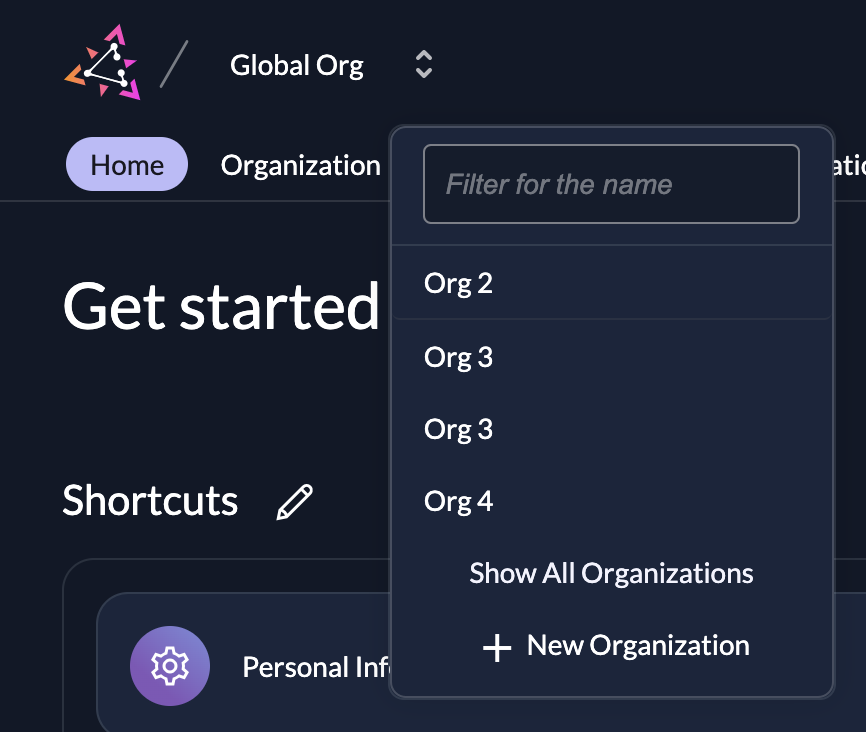
To understand how to structure your organizations, read our Solution Scenario guides.
Key Capabilities
The Management Console enables administrators to perform the following critical tasks:
- Default Settings: Administrators can configure global system defaults. This includes authentication methods, security policies (like password complexity or lockout policies), and other system-wide parameters.
- Resource Management: Create, update, and delete essential resources such as Organizations, Projects, and Applications.
- User Management: Manage the lifecycle of User accounts. This includes creating new users, updating profiles, resetting passwords, and deactivating accounts.
- Access Control: Define and manage permissions. Administrators can assign Roles to users and configure fine-grained access controls for specific resources.
- Administrator Assignment: Delegate administrative tasks by assigning Administrator roles (e.g., Org Owner, Project Owner) to specific users, ensuring proper oversight and segregation of duties.
- Customization and Branding: Customize the look and feel of ZITADEL. You can upload custom logos, select color schemes, and apply branding to match your corporate identity.
- Audit Logging: Access Audit Logs to track user activity and setting changes. This is essential for monitoring security events and maintaining regulatory compliance.
Security and Restrictions
Prevent Management Console Access
In many implementations, specifically white-label B2C scenarios, you may want to prevent end-users from accessing the generic ZITADEL Management Console entirely.
Administrators can restrict access to the management console, forcing users to interact only with your own applications or custom user interfaces. Please follow the Restrict Management Console Access guide to achieve this.
References
Was this page helpful?
